Hexo


  • Home

  • Archives

Cannot determine embedded database driver class for database type NONE

Posted on 2020-07-02

@[TOC](Cannot determine embedded database driver class for database type NONE)

1
2
// 就是这个地方多加了一个这个
<packaging>pom</packaging>

导致了报错,去看编译后的文件,也找不到对应的问题.
起初以为是yml的问题,最后我又自己敲代码,注意了yml的格式后,转念一想如果是yml文件里面有问题也应该是报错是报的是yml,而不是下面这个错误

1
2
3
4
5
6
7
8
9
10
11
12
13
14
15
16
17
rror starting ApplicationContext. To display the auto-configuration report re-run your application with 'debug' enabled.
2019-09-17 10:01:51.242 ERROR 11060 --- [ restartedMain] o.s.b.d.LoggingFailureAnalysisReporter :

***************************
APPLICATION FAILED TO START
***************************

Description:

Cannot determine embedded database driver class for database type NONE

Action:

If you want an embedded database please put a supported one on the classpath. If you have database settings to be loaded from a particular profile you may need to active it (no profiles are currently active).


Process finished with exit code 0

packaging:打包类型,默认是jar,可以配置成war、zip、pom类型。

POM是最简单的打包类型。不像一个JAR,SAR,或者EAR,它生成的构件只是它本身。

没有代码需要测试或者编译,也没有资源需要处理。打包类型为POM的项目的默认目标

生命周期阶段 目标

package site:attach-descriptor

install install:install

deploy deploy:deploy
简单来说pom 项目里没有java代码,也不执行任何代码,只是为了聚合工程或传递依赖用的。

总结:心平气和,Peace!
程序员誓言

Posted on 2020-07-02

The Programmer’s Oath(程序员誓言)

In order to defend and preserve the honor of the profession of computer
programmers, I Promise that, to the best of my ability and judgement
为了捍卫和维护计算机程序员的职业荣誉,我承诺,尽我所能和判断力

  1. I will not produce harmful code
    我不会产生有害的代码。
  1. The code that I produce will always be my best work. I will not knowingly
    allow code that is defective either in behavior or structure to accumulate
    我制作的代码永远是我最好的作品。我不会故意允许在行为或结构上有缺陷
    的代码。
  1. I will produce, with each release, a quick, sure, and repeatable proof that
    every element of the code works as it should
    每次发布时,我都会生成一个快速、可靠、可重复的证据,证明代码的每个
    元素都应该正常工作
  1. I will make frequent, small, releases so that I do not impede the progress of others
    我将经常发布小版本,这样我就不会妨碍其他人的进展。
  1. I will fearlessly and relentlessly improve my creations at every
    opportunity. I will never degrade them
    我会抓住每一个机会,无畏地不懈地改进我的代码。我永远不会损害它们。
  1. I will do all that i can to keep the productivity of myself, and others, as
    high as possible i will do nothing that decreases that productivity
    我将尽我所能保持自己和他人的生产力。我不会做任何降低生产力的事情。
  1. I will continuously ensure that others can cover for me, and that I can
    cover for them
    我将继续确保支持其他人的工作,并且他们也可以支持我的工作。
  1. I will produce estimates that are honest both in magnitude and
    precision I will not make promises without certainty
    我将对幅度和精度做出诚实的估计。我不会作出做不到的诺言。

9.I will never stop learning and improving my craft
我将永远不会停止学习和改进我的技艺。

From Robert cmartin

SpringServletContainerInitializer cannot be cast to javax.servlet.ServletContainerInitializer

Posted on 2020-07-02

org.springframework.web.SpringServletContainerInitializer cannot be cast to javax.servlet. ServletContainerInitializer
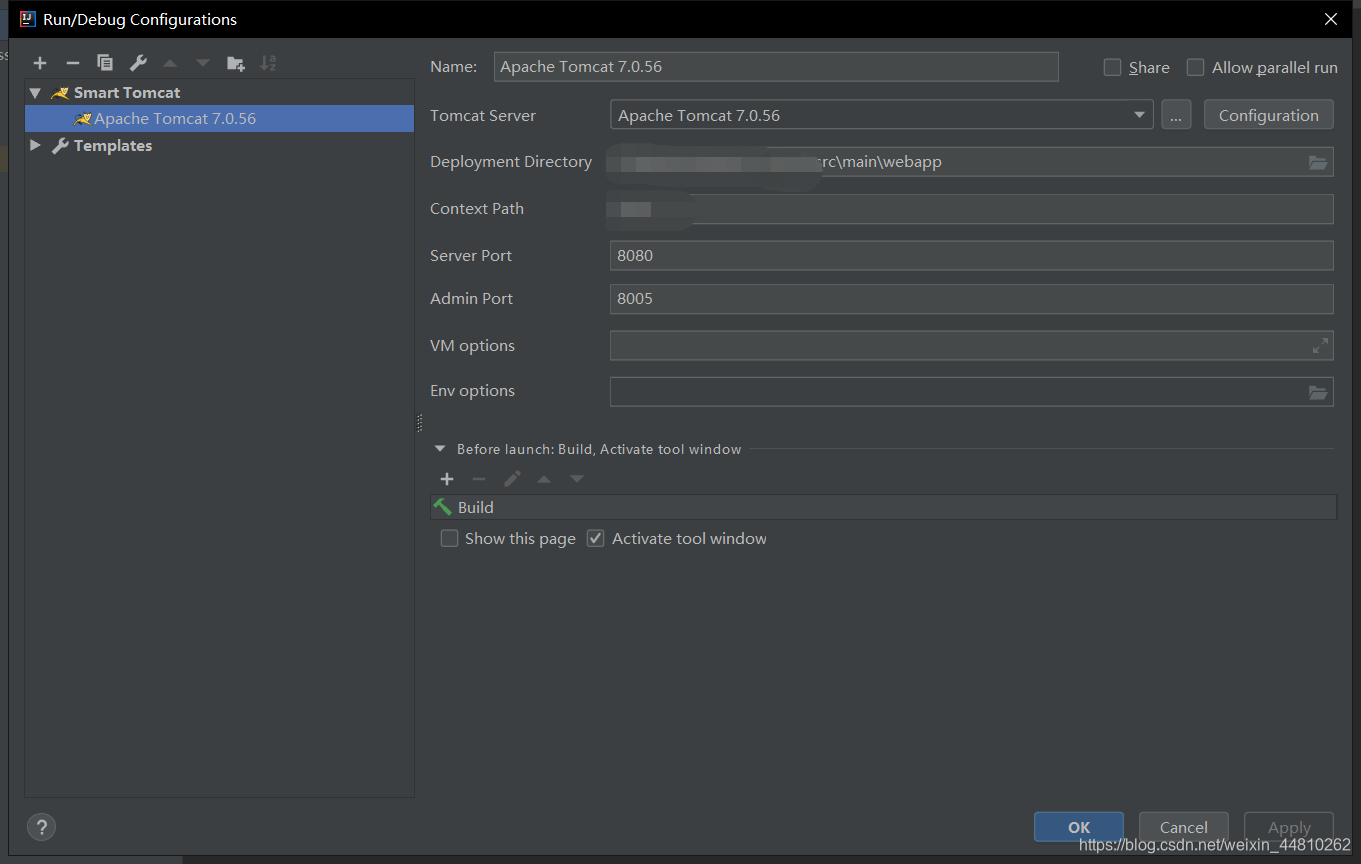
场景:SSM+tomcat7环境中用IDEA Community运行项目(基于Smart Tomcat),确认Smart Tomcat配置没问题后项目启动报错

报错原因:
项目的pom.xml配置了javax.servlet与tomcat7中的servlet-api.jar中的servlet冲突所造成的.
但是,工程是聚合工程,若将commons‘程里面的servlet-api依赖的 scope修改成 provided 就会导致其他依赖了 commons的工程找不到引用过 servlet-api中的类

解决方案
将commons工程中的pom.xml

1
2
3
4
5
6
<dependency>
<groupId>javax.servlet</groupId>
<artifactId>javax.servlet-api</artifactId>
<scope>provided</scope>
<version>{servlet-api.version}</version>
</dependency>

将依赖了commons工程中的pom.xml

1
2
3
4
5
6
<dependency>
<groupId>javax.servlet</groupId>
<artifactId>javax.servlet-api</artifactId>
<scope>provided</scope>
<version>{servlet-api.version}</version>
</dependency>

IDEA Community运行SSM,即配置tomcat

Posted on 2020-07-02

++++++++原因:社区版不支持Tomcat插件

解决办法:

1.Smart Tomcat

  • 去JB官网下载对应的支持的插件并集成
  • 配置对应的Tomcat在这里插入图片描述
  • 运行

2.Maven Plugin

  • POM集成
1
2
3
4
5
6
7
8
9
10
11
12
13
14
15
16
!-- Maven Tomcat Plugin -->
<plugin>
<groupId>org.apache.tomcat.maven</groupId>
<artifactId>tomcat7-maven-plugin</artifactId>
<version>2.2</version>
<configuration>
<!--Deploy to server-->
<!--<url>http://localhost:8080/manager/text</url>-->
<!--<username>admin</username>-->
<!--<password>admin</password>-->
<port>8080</port>
<path>/</path>
<uriEncoding>UTF-8</uriEncoding>
<server>tomcat7</server>
</configuration>
</plugin>
  • 运行

Bhan Li

4 posts
© 2020 Bhan Li
Powered by Hexo
|
Theme — NexT.Muse v5.1.4